



An authentication service goes down at 8:04 AM. Within minutes, tickets flood in. Your support team does what it always does: works the queue, one ticket at a time.
Here is the question nobody in the room can answer for the next 30 minutes: which customers are affected, and how much revenue is on the line?
That gap, between the tickets you can see and the revenue you cannot, is the support blind spot. During an incident, it is the most expensive gap in the company.
Support measures tickets. The business runs on revenue.
Every support tool is built to count tickets: open tickets, first response time, CSAT, SLA breaches. All useful. All necessary.
But none of them answer the question an executive actually asks during an outage: “Which accounts are at risk, and what are they worth?”
A support queue treats a $2,000 SMB ticket and a $320K enterprise renewal exactly the same way. During a normal week, that is fine. During an incident, it is how you lose a marquee account while the team is heads-down closing password resets.
During an incident, the signals scatter
Modern support does not live in one place. When something breaks, the picture is spread across a dozen tools:
- Zendesk and Intercom for tickets, SLA breaches, and bot deflection
- Slack for who is online and firefighting
- HubSpot and Salesforce for account value and renewal dates
- Jira for the engineering root cause and ETA
Each team watches its own tool. Nobody watches the whole board. So the incident commander assembles the picture by hand, in a Slack thread, while the clock runs.
What a support operations command center looks like
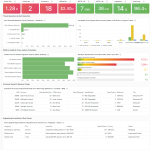
The fix is not more dashboards. It is one operational view that puts the incident, the health metrics, and the revenue at risk side by side. In a single screen:
- A live incident banner: what is down, since when, the root cause, and the estimated resolution.
- Operational KPIs: open and critical tickets, SLA breaches, average first response, CSAT, and agents online.
- Ticket spikes by category, so you staff the right queue before it breaks.
- Enterprise accounts at risk, with ARR, days to renewal, and risk level.
- The automated actions already taken: agents re-allocated, statuspage updated, CSMs alerted for the affected accounts.
Now the first 30 minutes of an incident look different. Instead of “how many tickets,” the team is asking “which $1.3M of ARR do we protect first,” and the answer is already on the screen.
From reacting to commanding
The difference between a support team and a command center is not effort. It is visibility and sequencing.
- See it. One view of the incident, the metrics, and the accounts.
- Triage it. Prioritize by revenue and risk, not by whoever shouts loudest.
- Protect it. Route agents to the queues that are breaching, and keep CSAT from cratering.
- Shield it. Get CSMs in front of the enterprise accounts before the renewal conversation turns.
Do this consistently and incidents stop being pure damage. They become the moment support visibly protects revenue, and the whole company notices.
Stop counting tickets. Start protecting revenue.
The support blind spot is not a lack of hard work. It is the lack of one view that connects tickets to the accounts and the revenue behind them.
Awishcar’s Customer Support Operations Command Center unifies Zendesk, Intercom, Slack, HubSpot, Salesforce, and Jira into a single operational view: live incidents, health KPIs, agent load, and enterprise ARR at risk, with automated actions built in. It is part of our Operational Intelligence Dashboards.
If you want to see your own accounts and revenue on that screen before the next incident, book a free walkthrough.
Related reading
Revenue hides in more than one blind spot. See The Silent Churn Killer (CRM + DB) and The AI Margin Trap (Token vs MRR).
Featured photo via Unsplash.